Transferring data between orchestrators can be quite a challenge. Until now, all assets, triggers, etc. had to be moved manually, which caused a lot of potential errors.
But, after all, we work in the intelligent automation industry, right? No surprise, it has to be done more efficiently!
Recently, UiPath presented a new feature for developers who most often work on separate test orchestrators or scale their solutions to new clients.
Here is how it works in practice.
Solutions Management – Overview
So. What is a solution?
A solution is a package that is a collection of components created and configured on the UiPath platform. It can be a simple, single process or a more complex solution – several processes, applications, and their dependencies.
Instead of manually transferring components from the UiPath platform, we can now pack everything into Solutions, manage versions, and deploy it between orchestrators. The tool that UiPath presented was aimed at facilitating the transfer of data.
The Solutions Management is available in the Automation Ops tab in the orchestrator.
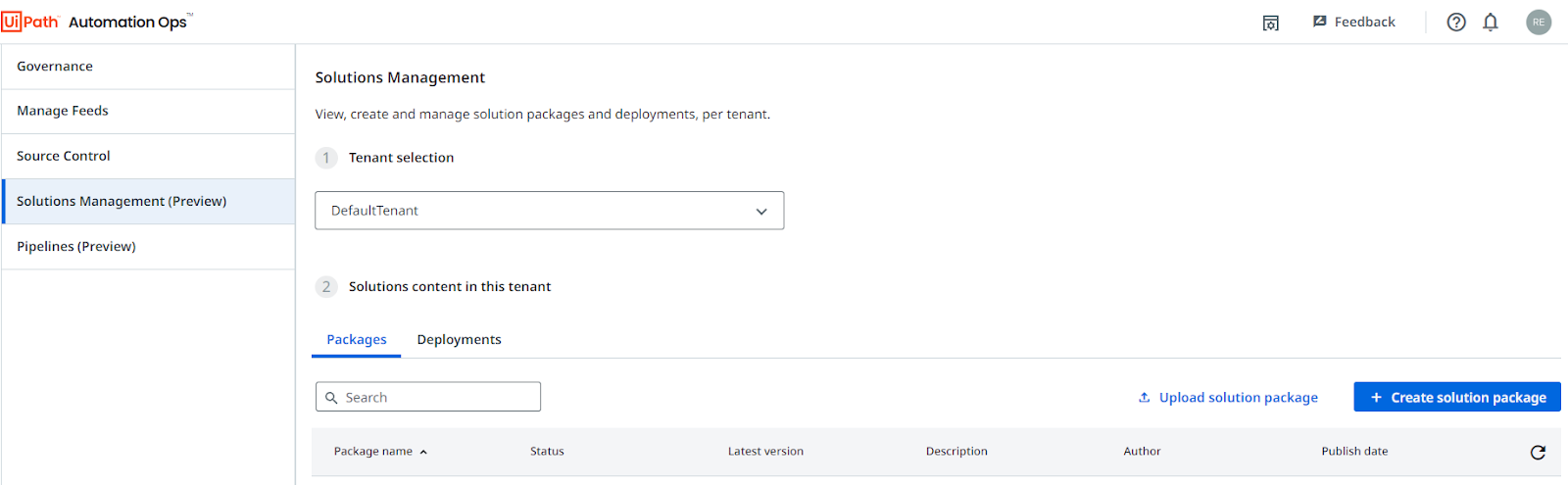
Solutions management combines many components, such as processes, assets, queues, etc., into one package, which can be downloaded and deployed in another target orchestrator.
Solutions Builder is an auxiliary tool for creating a package. It also allows editing the package – adding, removing, or modifying components.

Let’s talk!
In just 15 minutes, we’ll cut through the noise and see if automation works for you.
Why UiPath Solution Management?
Solutions Management helps deal with the following problems:
- transferring configured components between orchestrators,
- process deployment – the created package in solution management is very easy to deploy in a new environment, which helps to prevent errors in data transfer
- management – you can manage your packages by updating and releasing new versions.
Packages are created per tenant – when entering the solutions management tab; we first have to choose the tenant for whom we want to create a solution package.
To load a solution package, you need to:
- go to the management of the solution in the target orchestrator,
- select under the appropriate tenant the option “upload solution package”,
- choose the right file.
Simple as that! Remember that credentials are not transferred between orchestrators, and when deploying a new package, you need to fill in the assets of the Credential type.
You can learn more about the Solution Management feature from this video published by UiPath:
Conclusions
I have been eagerly awaiting this feature for a loooong time. I typically use a test orchestrator to trial my automations and then have to manually transfer all the assets, which effectively doubles the workload.
Creating a package with a solution is convenient and helps minimize errors. The only limitation is that not all data can be transferred yet. Currently, we can transfer the following data: processes, assets, queues, storage buckets, and triggers.
I look forward to expanding the solution to include additional components such as users (including types of permissions), robots, and connected machines – this will make my UiPath development even more efficient!
UiPath team, I hope you read that ;)
Liked what You've read? Spread the word!
At Flobotics we specialize in U.S. healthcare revenue cycle management process automation – no generic bots here.
Ready to scale without growing headcount?
Let’s talk!
Ready to automate your business processes?
Karl – our CTO loves to discuss the ROI. Feel free to book a call with him.
In just 15 minutes, we’ll help you assess whether automation is right for you.




![Specific Content Limitations in UiPath [RPA Developer’s Investigation]](https://cdn.prod.website-files.com/6953a9bbd8e7404f6a765c34/6973723f64125f273d5ecb29_22c654c2-5bc3-4840-9cf5-f5cd591ba6eb.avif)